
Creating Your Own DIY Security Alarm System


Creating Your Own DIY Security Alarm System
Ever hear a strange bump in the night and feel that jolt of anxiety? You lie in bed, listening, wondering if it was just the house settling or something more. Professional security systems offer peace of mind, but for many homeowners, the high monthly fees and long-term contracts are a dealbreaker. The good news is that securing your home is no longer an all-or-nothing choice.
A new generation of do-it-yourself security alarm systems puts the power back in your hands. If you can set up a new smart speaker, you already have the technical skills you need. These are affordable home security solutions designed for everyday people, not tech experts. You get to protect your home without the monthly fee locking you into a service, giving you control over your safety and your budget.

Building your own system boils down to three simple steps: choosing components, deciding on monitoring, and putting it all together—a process that for most people takes less than an afternoon. This guide will explain each decision in simple terms, giving you the confidence to build a system that turns nighttime worry into genuine peace of mind.
Learn the “Core Four” components: the hub, contact sensors, motion sensors, and the keypad/app
Your security system will be built from four key pieces of equipment. Getting to know these “Core Four” components is the first step toward creating a system that’s perfect for your home. The best part? Because they are wireless and don’t require any drilling, you can have an easy-to-install security system up and running in under an hour.
First, every system has a “brain,” usually called the Hub or Base Station. Think of it as the central command post. It plugs into your wall and connects to your home’s Wi-Fi. All of your other security devices report back to this hub, which is what actually sounds the alarm and sends alerts to your phone if something is wrong.
Next are the Contact Sensors. These are simple, two-piece magnetic sensors that you stick onto doors and windows. When a door or window is closed, the two pieces are side-by-side. If it’s opened, the pieces separate, which instantly tells the hub to trigger an alert. They are the frontline defenders for every potential entry point into your home.
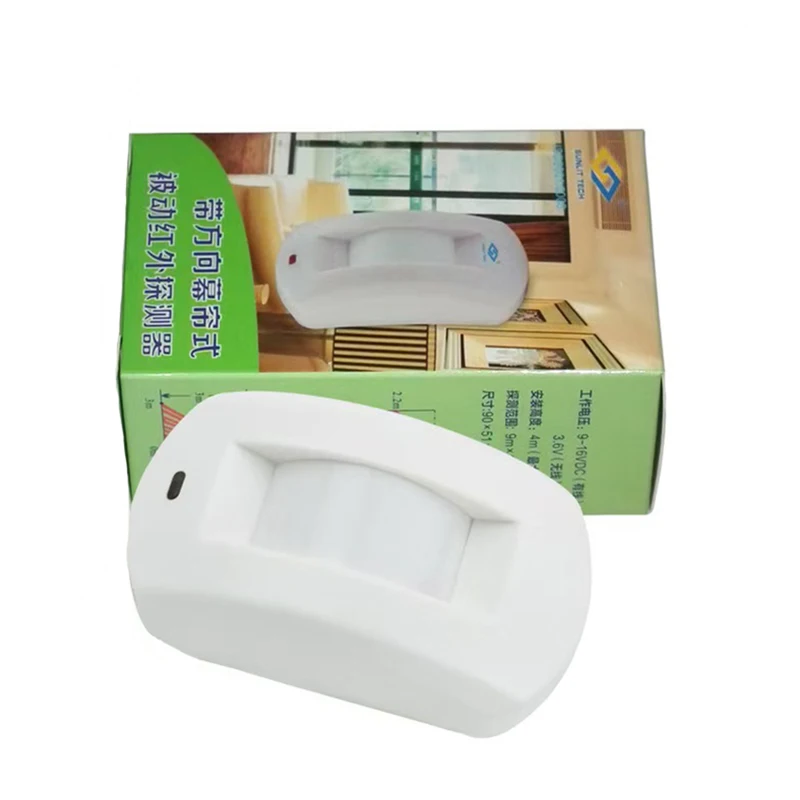
To protect the open spaces inside your home, you’ll use Motion Sensors. Instead of watching a single door, a motion sensor for a home alarm covers an entire area, like a living room or a main hallway. It works by detecting movement and body heat. Modern sensors are even smart enough to ignore pets under a certain weight, preventing your cat from causing a false alarm.
Finally, you need a way to arm and disarm your system. This is done with a Keypad, which you can mount near your main door, or more commonly, through an app on your smartphone. The app gives you full control from anywhere, letting you check your system’s status, arm it after you’ve left, or disarm it for a friend. With these four components working together, you have a complete and effective security system.

The Single Most Important Decision: Self-Monitoring vs. Professional Monitoring
With the components in place to detect a problem, the next crucial choice is deciding who gets the alert. This decision determines your monthly cost and who is responsible when an alarm sounds. This is the core difference when comparing monitored vs unmonitored security systems.
With a self-monitored home alarm system, you are in complete control. When a sensor is triggered, the hub sends a notification directly to your smartphone. It’s then your responsibility to check on the situation—by looking at a security camera feed or calling a neighbor—and decide whether to call the police. The biggest advantage here is clear: you can protect your home without a monthly fee. The drawback, however, is that if you miss the alert because you’re in a meeting, on a plane, or asleep, no one else is there to respond.
Professional monitoring works differently. For a monthly subscription fee (typically $10-$30), your system alerts a dedicated 24/7 monitoring service. A trained agent will immediately attempt to contact you to verify the alarm. If they can’t reach you or you confirm it’s a real emergency, they dispatch police, fire, or medical services on your behalf.
To make it simple, here’s a direct comparison:
| Feature | Self-Monitoring | Professional Monitoring | | :— | :— | :— | | Monthly Cost | Usually $0 | ~$10 – $30/month | | Who Calls for Help? | You do. | The 24/7 monitoring service. | | Best For | Budget-conscious users who are always near their phone. | Those wanting maximum peace of mind, who travel, or can’t always respond. |
Ultimately, the right choice depends entirely on your budget and lifestyle. Once you’ve decided on your monitoring style, you can move on to the fun part: figuring out exactly which components you need to secure your unique space.
How to Plan Your Perfect System in 15 Minutes
Figuring out what you need is simpler than it sounds and doesn’t require technical knowledge. Perform a quick “vulnerability audit”—a 15-minute walk-through of your home, looking at it from an intruder’s perspective. This exercise provides a concrete shopping list tailored to your space.
Your first layer of defense is the perimeter of your home. This concept, known as Perimeter Protection, is all about securing the most obvious entry points. Start on your ground floor and walk from room to room. Count every door that leads outside (front, back, patio) and every window. Each one of these is a potential vulnerability that needs a contact sensor. Add them up—that’s the number of contact sensors your home requires.
Beyond the perimeter, your second layer of security is the interior. What if someone breaks a window instead of opening it? This is where you need a safety net. Place motion sensors for home alarm systems in high-traffic areas that an intruder would have to cross. For most homes, one in the main living room and another in a central hallway is a fantastic start. These act as a backup, catching any movement inside your home that shouldn’t be there.
With that simple walk-through, you’ve created a personalized shopping list: a specific number of contact sensors for your perimeter and one or two motion sensors for the interior. These components are the heart of the best wireless home security kit for your unique needs. Now, with your custom plan in hand, you might be asking: Is a system I build myself really as effective as one from the professionals?
Are DIY Alarms As Good As Professional Systems?
This is a common question, and the answer is a resounding yes. The effectiveness of a security system isn’t about who installs it; it’s about the quality of the components and how they are used. A well-placed contact sensor doesn’t care if it was installed by a paid technician or by you on a Saturday afternoon—it works the exact same way.
At their core, the sensors that make up the best wireless home security kit use the same proven technology as professionally installed systems. The motion sensor still detects heat and movement, and the contact sensor still detects a door or window opening. The hardware’s ability to spot a problem is fundamentally identical. You are not sacrificing detection quality by choosing to do it yourself.
The real choice you make with a DIY system isn’t about hardware effectiveness, but about your monitoring preference. When the alarm sounds, do you want an alert sent only to your phone (self-monitored), or do you want a 24/7 service that calls emergency responders for you (professionally monitored)? Many DIY brands offer an optional, no-contract monitoring plan, giving you the best of both worlds.
This is exactly why are DIY alarm systems effective is a question with a confident answer. The market is led by major, reputable companies that have built their entire business on reliable, user-friendly hardware. When you look at brands like SimpliSafe vs Ring Alarm, you’re seeing systems trusted by millions of homeowners. Now that you know these kits are just as capable, let’s look at how surprisingly simple it is to get one up and running.
How to Install Your Wireless Alarm System in Under an Hour
How to Build a Local Smart Home Alarm System!
If the thought of “installation” brings to mind a mess of wires and a dusty toolbox, you can relax. Today’s kits are designed to be an easy to install security system, often taking less time than assembling a piece of flat-pack furniture. The entire process is wireless, tool-free, and guided by a simple app on your phone.
Installation is very simple—most DIY alarm kits are designed for quick, tool-free setup with adhesive mounts and an app walkthrough. If you buy a kit or accessories on marketplaces like AliExpress or eBay, installation is usually very simple as well, and setup instructions are typically provided with the purchase (either in the package, the listing details, or via a download/link from the seller).

Most systems follow the same frustration-free, four-step setup:
Set Up Your Hub & App: Plug the main hub into power, connect it to your Wi-Fi using the smartphone app, and create your account.
Pair Your Sensors: Follow the app’s instructions. This usually involves pulling a battery tab or pressing a button on each sensor to make it visible to the hub. Give each one a name, like “Living Room Window” or “Front Door.”
Place Your Sensors: With everything paired, take your sensors to their pre-planned spots. Just clean the surface, peel the backing off the included adhesive strips, and press the sensor firmly in place.
Test the System: Use the app’s “Test Mode.” Walk around and open each protected door and window. The hub will confirm aloud that it received the signal from each sensor, giving you 100% confidence that everything is working perfectly.
The physical part of the installation is genuinely that simple. As you can see in the image, placing a sensor is as easy as peeling and sticking it onto a clean door frame—no drilling or damage required. While some users eventually move on to DIY home security camera installation, this core alarm setup is designed for absolute simplicity.
With your new digital watchdog fully tested and operational, you’ve already built a powerful layer of security for your home. Now, let’s explore some simple upgrades that can take your peace of mind to the next level.

Beyond the Basics: Smart Upgrades Worth Considering
Your core system is a fantastic deterrent, but a few smart upgrades can solve common “what if” scenarios, making your system even more reliable without adding complexity.
Think of your alarm’s Wi-Fi connection as the main road for alerts. If it gets cut off, no messages get through. This is where home security with cellular backup acts as a private, secondary road. For a small optional monthly fee, many systems can use the same reliable network as your smartphone. If your internet ever drops, your system automatically switches to this backup path, ensuring alerts are never missed and your connection remains unbroken.

Adding security cameras offers more than just a recording; it provides instant visual proof. The best smart home security integration allows your system to link an alarm event to a video clip. Instead of just getting a “Motion Detected” alert, you can immediately see a short video of what caused it. This lets you confirm a real emergency in seconds, and the DIY home security camera installation is often as simple as plugging the camera in and connecting it to your app.
Finally, security isn’t only about break-ins. You can easily expand your system to protect against common household dangers. By adding affordable sensors that detect smoke, carbon monoxide, or water leaks, your hub becomes a central guardian against fire and flood damage, too.
Calculating the Real Cost of Your DIY Security System
How much does a self-install security system cost to get started? For most homes, a starter kit from a trusted brand, whether you’re comparing SimpliSafe vs Ring Alarm or others, will run between $200 and $400. This one-time purchase gives you the core components—the hub, a few door and window sensors, and a motion detector—that form the foundation of your home’s protection.
The other side of the equation is monitoring. At its most basic, your system is free to operate; when an alarm is triggered, an alert is sent directly to your phone. If you want the peace of mind that comes with 24/7 professional monitoring, where a company can dispatch emergency services for you, it’s an optional upgrade. These affordable home security solutions typically offer plans for around $10-$30 per month, with no restrictive long-term contracts.
When you put it all together, the long-term value becomes clear. Even with professional monitoring, a DIY system might cost around $800 over two years. In contrast, traditional contract-based systems can easily exceed $1,500 in the same period due to installation fees and higher monthly rates. This significant savings is what empowers you to get top-tier protection without breaking the bank.
Your Weekend Project for Years of Peace of Mind
You now have the knowledge to identify your home’s unique needs, understand each component, and decide on the right monitoring style for your life. You’ve transformed any initial confusion into a clear path forward. Here is your final plan to turn that knowledge into real security.
Your Action Plan:
Walk through my home and list my entry points.
Choose my system (and monitoring type).
Set aside one afternoon for installation.
The question is no longer if you can set up a wireless alarm system, but when. That single afternoon of effort is a small investment for lasting peace of mind. You now have the power to create an easy to install security system that you understand and control, protecting your home on your own terms.


Best Cheap Home Security Systems for 2026: Save on Safety CNET...
4-Pack Home Security Alarms – Loud 90dB Door & Window Sensors, Easy Peel & Stick umlconnector.com...
10 Best Home Security Systems of 2026: Reviewed & Tested U.S. News Real Estate...
Best Home Security Systems of 2026, According to Over 11,000 CR Members Consumer Reports...

You May Also Like

Benefits of Installing Solar Power Outlets
