
Choosing the Best 16 Camera Wireless Security System
Choosing the Best 16 Camera Wireless Security System
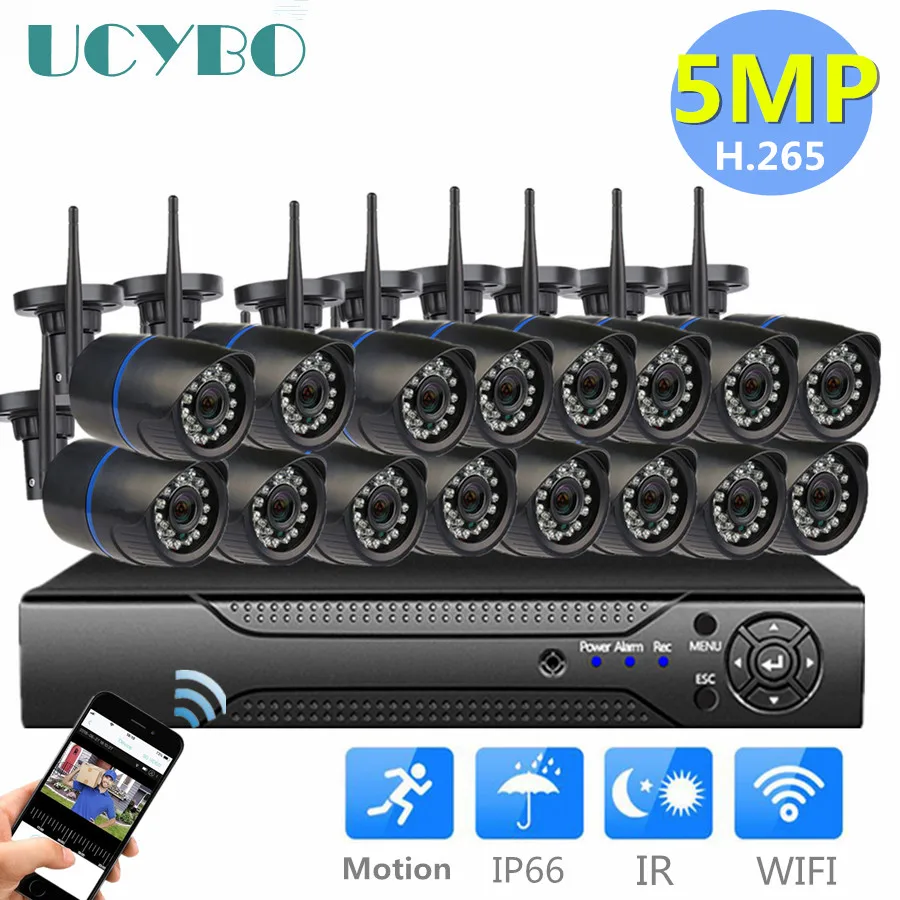
The idea of a ’16 camera wireless security system’ might conjure images of a complex, spy-movie control panel. The reality is far more user-friendly. Modern systems offer a simple, all-in-one solution for total security, which is essential for large properties or small businesses where a few cameras leave dangerous blind spots. A 16-camera system is designed to provide gap-free coverage from the parking lot to the front entrance, delivering genuine peace of mind. This guide breaks down the core components and key questions to help you make a confident decision. Whether you’re comparing a 16 camera security system to smaller kits, the goal is comprehensive, reliable coverage.
The #1 ‘Wireless’ Mistake to Avoid Before You Buy
When shopping for a security system, the word ‘wireless’ can be seriously misleading. This common point of confusion can lead to major headaches, so it’s crucial to understand the difference. In the world of security cameras, wireless refers to the video signal, not the power source. This means the camera sends its video footage through the air to a central hub using Wi-Fi, eliminating the need to run a video cable through your walls.
However, the camera itself still needs electricity to operate. Think of your television—it receives a signal wirelessly, but you still have to plug it into a wall outlet for power. The cameras in a 16-camera wireless system work the same way. Each one has a power cord that must be connected to a nearby electrical outlet to provide the constant, reliable power needed for 24/7 recording.

This is different from products you might see advertised as “wire-free.” Those cameras are powered by batteries. While convenient for one or two spots, managing and recharging 16 separate batteries would quickly become a part-time job. For a large, powerful system designed for total coverage, wired power is the only practical solution for dependable, set-it-and-forget-it security. For comparison, a coax security camera setup uses coaxial cabling to send video to a DVR, offering a fully wired alternative to Wi‑Fi-based systems.


The 3 Simple Parts of Every 16-Camera System
A 16-camera system might sound complex, but it consists of just three simple parts. Understanding these components reveals how manageable and powerful an integrated setup can be.
The most important part is the system’s ‘brain,’ called a Network Video Recorder (NVR). If you’ve ever used a DVR to record TV shows, you already understand what an NVR does. It’s a central box that connects to your internet router. All your wireless cameras send their video footage to this one device, which records and stores everything on a large, built-in hard drive. This is the heart of a 16 channel NVR security system.
Of course, you have the cameras themselves—the ‘eyes’ of your operation, which you place around your property. The final piece is how you view the footage: either on a connected TV or computer monitor, or more commonly, through a single, dedicated app on your phone or tablet. Some packages even include a wireless security camera with monitor for instant, out-of-the-box viewing alongside the mobile app. This means you can check all 16 cameras, live or recorded, from one simple interface without needing multiple accounts or subscriptions.
The cameras wirelessly send video to the NVR, which handles all recording and storage. You can then tap into that NVR from anywhere using your app. Since this one box is responsible for saving all that high-quality video, it raises an important question: how much storage is really needed?
How Much Storage Is Really Needed for 16 Security Cameras?
Since the NVR saves all footage, determining the right amount of storage is a critical step. You have two main paths: storing it directly on your NVR (local storage) or saving it online (cloud storage).
Think of it like saving personal photos. Local storage is like keeping pictures on your computer’s hard drive—it’s all stored right there in your home, with no monthly fees. In contrast, cloud storage options for multi-camera systems are like using Google Photos or iCloud—your video is sent over the internet and saved on a secure server, which usually requires a subscription.

- Local Storage (on the NVR):
- Pro: One-time cost; you own the footage without monthly fees.
- Con: If a thief steals the NVR, they take the evidence with them.
- Cloud Storage:
- Pro: Your footage is safe off-site, even if equipment is stolen.
- Con: Almost always requires a recurring subscription fee per camera.
For a system this size, most people choose the cost-effective NVR route. A 16 channel NVR with 4K cameras running on a 4TB hard drive is an excellent starting point, giving you plenty of capacity. This might sound small for 16 video streams, but systems use a clever trick to make that space last for weeks or even months: motion-detection recording.
Instead of recording empty hallways 24/7, the cameras only save footage when they detect movement. This dramatically cuts down on wasted space, ensuring your hard drive is filled with important events, not hours of inactivity. This smart recording is just one example of how modern features improve security.
Beyond ‘HD’: 3 Camera Features That Actually Deliver Better Security
While standard HD video is good, a security system’s real value lies in the details. When you’re trying to identify a person or a license plate from a distance, you need more than just a blurry picture. This is why a 16 channel NVR with 4K cameras is a game-changer. The ultra-high resolution of 4K means the video is four times sharper than standard 1080p HD, allowing you to digitally zoom in on recorded footage and still see critical details with stunning clarity.

While daytime clarity is important, a system’s true value is often proven after dark. This is where night vision comes in, but not all night vision is created equal. The key detail to look for is the effective distance. Many cameras use infrared (IR) lights to see in total darkness, so you should check for a specific range, like 100 or even 130 feet. This ensures the camera can see all the way across your yard or parking lot, not just a few feet in front of the lens.
For cameras mounted outside, surviving the elements is non-negotiable. The best outdoor security camera features always include a high weatherproof rating. You’ll see this listed as an ‘IP’ code, like IP66. In simple terms, this means the camera is completely sealed against dust and can withstand powerful jets of water from any direction, ensuring it will keep working through heavy rain, snow, and wind.
Together, these features—sharp 4K detail, long-range night vision, and rugged IP66 weatherproofing—are what elevate a system into a professional grade wireless surveillance kit. They ensure you get usable evidence, day or night, rain or shine.
Will 16 Cameras Crash Your Wi-Fi? (And How to Prevent It)
A common worry is that 16 cameras will bring your internet to a screeching halt. But here’s the key difference: when you stream a movie, you’re downloading data. Your security cameras are constantly uploading video. Think of it like a highway—for cameras, it’s the outbound traffic lane that matters, not the inbound one.

You can easily check your home’s upload speed using a free online tool like Speedtest by Ookla. For smooth 4K video, you’ll need sufficient wireless security camera bandwidth requirements , typically 1-2 Mbps of upload speed available per camera. This means a stable upload speed of at least 20-25 Mbps is a solid foundation for a full 16-camera system.
Speed isn’t the only factor; signal strength across your entire property is just as important. If your router struggles to reach the garage or a back corner of the yard, you’ll need to know how to improve wifi signal for security cameras. The easiest and most effective modern solution is a mesh Wi-Fi system. Instead of one router, it uses several smaller ‘nodes’ to blanket your home and yard in a strong, seamless signal.
By ensuring you have enough upload bandwidth and consistent coverage, your network can easily handle the demands of a professional-grade system.
DIY or Pro Install: What’s Really Involved in Setting Up 16 Cameras?
With your Wi-Fi sorted, the next step is installation. You face a key decision: a DIY project to save money or a professional installation to save time? The answer depends on your comfort with basic tools and the time you can dedicate to the project.
A DIY installation for 16 zone security cameras is less technically complex than it sounds. Since the cameras are wireless, you won’t be snaking video cables through walls. You’ll mainly be mounting each camera and plugging its power adapter into a nearby outlet. If you can use a power drill and work safely on a ladder, you have the skills. The real challenge isn’t the difficulty, but the repetition of doing the same task 16 times.

However, a professional security camera installation offers more than just convenience. Experts know precisely how to install security camera system components for optimal viewing angles and can hide wires cleanly for a polished look. If you’re uneasy on a ladder or the thought of drilling numerous holes in your home sounds like a headache, budgeting for a pro is a smart investment to get it done right the first time.
The choice is a simple trade-off between your budget and your time. Whether you enjoy the satisfaction of a weekend project or prefer the turnkey efficiency of a professional, the end result is a fully protected property with no blind spots.
From Overwhelmed to Protected: Your Final Checklist Before You Buy
Choosing a security system no longer needs to feel like solving a technical puzzle. You can now confidently find the best 16 camera security system by focusing on what truly matters. Use this final checklist to ensure your chosen system meets the key standards for effective, reliable protection.
Your 5-Point Shopping Checklist:

- A 16-Channel NVR with at least a 4TB Hard Drive.
- True 4K (8MP) Resolution Cameras.
- Outdoor Cameras with an IP66+ Weatherproof Rating.
- An easy-to-use Mobile App for remote viewing.
- Positive reviews for customer support and reliability.
This list is your blueprint for achieving the peace of mind that comes from knowing your property is secure.
You May Also Like

A Practical Guide to Security Cameras: Wired vs Wireless

TechoElite Smart Homes Only: What They Offer and How to Get Started
